
Help for creating prayer and reading videos
It can be a bit daunting to record yourself doing a bible reading a prayer but here are a few hints and tips for the perforce video:
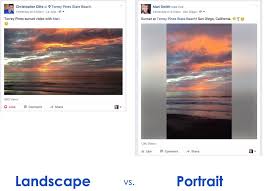
Portrait v Landscape
If you are using a phone of a tablet please hold it horizontally (in landscape or sideways mode) This way your video better matches the shape of the rest of the videos and we won't have to put ugly black borders at the side!
Viewing Angle
You need to try and get the camera or the phone as high as possible preferably at head height. Use a stack of books or boxes if you don't have a tripod. It can look a bit ominous if you are looming over the viewers!
Background
Try to avoid a completely bright white background. Most phones will struggle to get the colour balance of skin tone right against a very bright white background.
Beginning and End
At the beginning of the video please look into the camera or phone quietly for about 5 seconds before you start to speak, similarly when you finish smile into the camera for another 5 seconds. This will give us the opportunity to edit and fade into and out of your section. Any chaos that you record before or after these silences can be edited out.